
Nano GPT logo
NanoGPT
Nano GPT logo
NanoGPT
Conversations
Create Media
Workspace
Gallery
Models
Pricing

Account

Balance
Usage
Settings
API
Presets
Invitations
Subscription
Teams

Resources

Benchmarks
Suggestions and bugs
Batch API
Blog
Help
Applications
Earn
Partners
Terms

|

Privacy

|

Refunds

Private AI

Back to Blog

Using Cline with NanoGPT
Jan 14, 2025
Using Cline with NanoGPT

Want to use Cline with NanoGPT? Here's all you need to know.

Setup Instructions

  1. Get your API key from nano-gpt.com/api
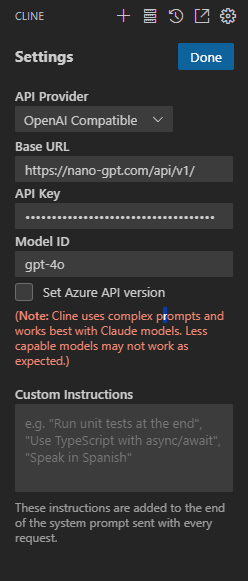
  2. In Cline settings, add a new Custom Model with these details:
    • API Provider: OpenAI Compatible
    • Base URL: https://nano-gpt.com/api/v1/
    • API Key: Your key from step 1
    • Model ID: gpt-4o

That's it! You can now use Cline with every model you can think of. Model names are on our pricing page - important ones are o1, claude-3-5-sonnet-20241022, yi-lightning, deepseek/deepseek-chat, or just any other model you fancy.

Need a visual guide? Check the settings image above.

Want to explore available models? Visit our pricing page.

Milan de Reede

Milan de Reede

CEO & Co-Founder

milan@nano-gpt.com

Related articles

Continue with more NanoGPT guides and research on this topic.

Setting Up Java for OpenAI API Integration

Learn how to set up Java for seamless integration with OpenAI's API, optimizing performance and ensuring data security throughout the process.

May 12, 2025

Setting up LibreChat with NanoGPT's API

Learn how to configure LibreChat to work with NanoGPT's API through a simple YAML configuration.

Mar 28, 2025

Legal API Integration for Contract Summary Text

Treat AI contract summaries as draft workflows: clause-level inputs, mandatory attorney approval, and strict data retention controls.

Aug 8, 2026

How to Build Tool-Using AI Workflows with the Responses API

A practical guide to custom tools, public MCP servers on supported OpenAI models, streaming tool calls, and stored response chains in NanoGPT's Responses API.

Jul 21, 2026
Back to Blog