
ONNX Interoperability with AI Frameworks: FAQ

You can train a model in one framework and run it somewhere else with ONNX - but only for inference, not training. That’s the big point. If I export a model to ONNX, I still need to check opset support, test outputs with the same input, and rebuild any sampling or post-processing that was never part of the graph.
Here’s the short version:
- ONNX moves inference graphs, not full training state.
- PyTorch, TensorFlow/Keras, scikit-learn, and Hugging Face tools can export models to ONNX.
- ONNX Runtime is the main place to run exported models, with hardware backends such as TensorRT, OpenVINO, and Core ML.
- Common failure points include unsupported operators, dynamic control flow, dtype issues, shape/layout mismatches, and frozen random ops.
- Output checks matter: I should run
onnx.checker, then compare source and ONNX outputs withallclose. - Opset choice matters a lot: for example, native
AttentionandRotaryEmbeddingsupport starts at opset 23,Swish/SiLUat 24, and native FP16/BF16 range support at 27.
A simple rule helps: export, validate, compare, then deploy. If outputs drift a little, that can be normal. If outputs turn constant or wrong, the export likely dropped behavior outside the forward graph.
| Area | What to know |
|---|---|
| Scope | ONNX is for inference portability |
| Not included | Training state, training workflow, sampling loops, post-processing |
| Export tools | torch.onnx, tf2onnx, sklearn-onnx, optimum |
| Main checks | model.eval(), fixed input, onnx.checker, allclose |
| Common issues | Ops, control flow, dtypes, shapes, randomness |
| Best next step | Use the lowest opset that still supports your model |
If I want framework switching without rewriting deployment code for each target, this FAQ lays out the main path - and the main places things go wrong.
ONNX: The Missing Link Between AI Frameworks
sbb-itb-903b5f2
Which frameworks, converters, and runtimes ONNX supports
ONNX spans three layers: source frameworks, conversion tools, and inference runtimes. That setup shapes the stack you use to export, convert, and deploy a model.
Frameworks and export tools
PyTorch models are exported with the built-in torch.onnx module, which supports multiple opset versions. Before export, set the model to evaluation mode with model.eval() so dropout and other training-only layers don’t change inference behavior.
TensorFlow and Keras models are exported through tf2onnx, a separate library that translates the graph into ONNX. scikit-learn uses sklearn-onnx for classical machine learning models such as SVMs, random forests, and linear models.
For transformer models, Hugging Face offers dedicated export paths through optimum, which produces ONNX-ready exports for transformer architectures.
Here’s the quick breakdown:
| Framework or Tool | Role | Typical Export Path | Common Model Types |
|---|---|---|---|
| PyTorch | Source Framework | torch.onnx.export | CNNs, Transformers |
| TensorFlow / Keras | Source Framework | tf2onnx | Vision, NLP, Legacy models |
| scikit-learn | Source Framework | sklearn-onnx | SVMs, Random Forests, Linear Models |
| ONNXMLTools | Converter | ONNXMLTools API | Classical ML ecosystems |
| Hugging Face | Transformer Export | optimum / HF Export | BERT, GPT, Llama, ViT |
| ONNX Runtime | Runtime | N/A | All ONNX-compatible models |
| TensorRT / OpenVINO | Execution Provider | N/A | NVIDIA/Intel optimized inference |
Inference runtimes and deployment targets
After export, the next issue is simple: where will the model run?
ONNX Runtime (ORT) is the main cross-platform execution engine. It runs on CPU, GPU, and edge hardware without needing the original training framework. Its Execution Provider system lets you connect hardware-specific backends such as NVIDIA TensorRT for GPU-tuned inference, Intel OpenVINO for Intel hardware, and Apple Core ML for on-device deployment on macOS and iOS.
Once you’ve picked the runtime, the next step is to check that the exported model still lines up with the original one.
How framework switching works with ONNX
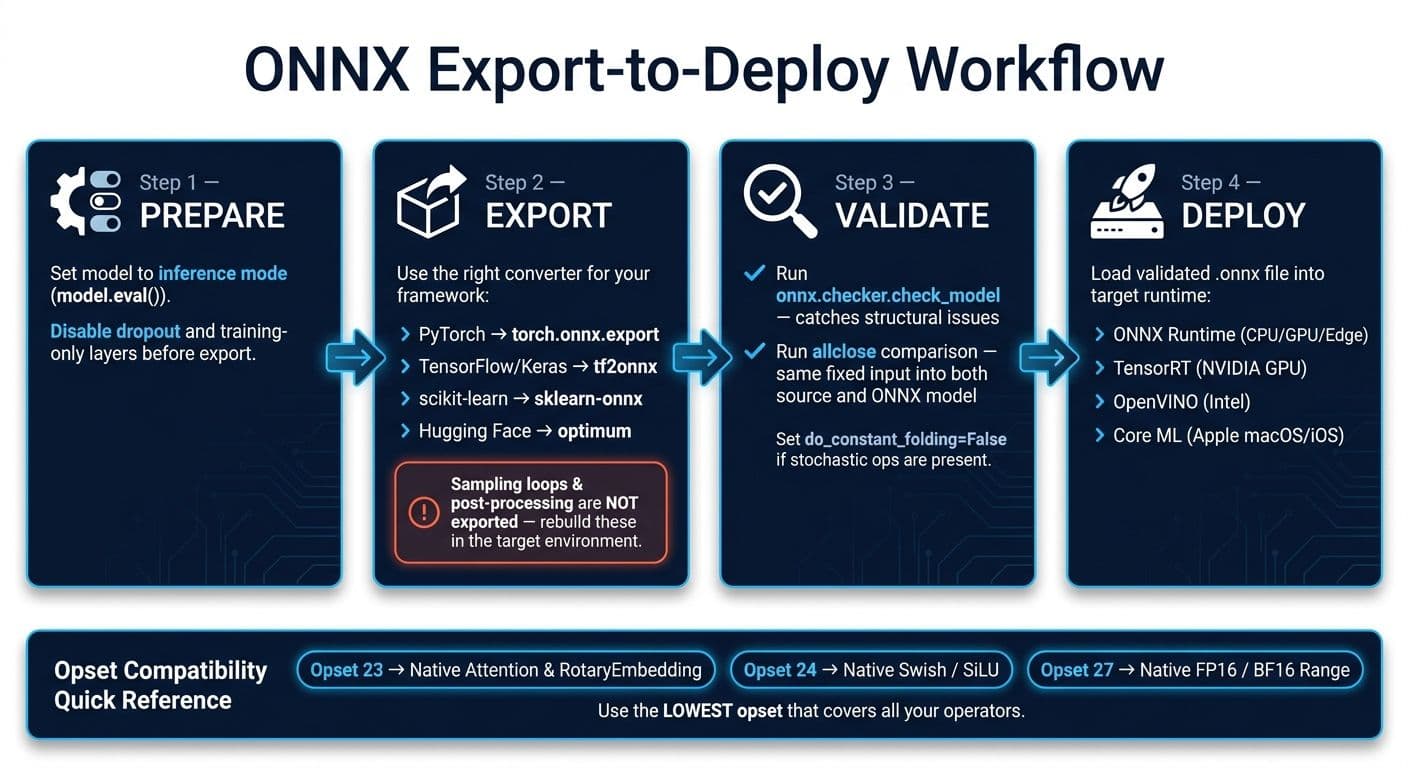
ONNX Export-to-Deploy Workflow: Prepare, Export, Validate, Deploy
ONNX lets you take a trained model and run it in a different inference runtime. It does not move the model back into training. You export the model as a .onnx file, and a compatible runtime executes that file on the hardware you care about.
Once that part is clear, the next step is simple: move the model from the source framework into the runtime without breaking anything along the way.
The basic export-to-runtime workflow
The workflow is straightforward: prepare, export, validate, then deploy.
Prepare: Put the model in inference mode before export.
Export: Use the right converter for your stack - PyTorch (torch.onnx.export), TensorFlow/Keras (tf2onnx), or a JAX/Flax converter - and save the output as a .onnx file. One catch: sampling, generation loops, and other post-processing steps are not exported. You need to rebuild those parts in the target environment. If post-processing is missing after export, recreate it in the target runtime.
Validate: This is where you catch structural problems before deployment. First, check the model structure with onnx.checker. Then run an allclose comparison against the source model using the same input.
Deploy: Load the checked .onnx file into the target runtime and run inference.
After export, compatibility comes down to the opset you choose and the runtime version you plan to use.
Opset versions, model metadata, and compatibility checks
Every export targets an opset. The opset defines which operators are available and how they behave. In practice, you usually want the lowest opset that still covers every operator your model uses. That gives you the best chance of running the model across more runtimes.
| Feature / Operator | Minimum Opset | Notes |
|---|---|---|
| Attention / RotaryEmbedding | Opset 23 | Supported directly in this opset; older versions use fallback implementations |
| Swish / SiLU | Opset 24 | Supported directly in this opset; earlier versions use fallback implementations |
| Native FP16/BF16 Range | Opset 27 | Earlier versions may require cast fallbacks |
Before deployment, make sure the source framework, converter, ONNX package, opset, and runtime all line up. When they don’t, conversion tends to fail in fairly predictable ways.
When ONNX conversion breaks and how to reduce the risk
A model can still fail after export, even when the opset looks compatible.
Common reasons exports fail or produce wrong outputs
The usual trouble spots are framework-only operators, dynamic control flow, and type mismatches.
These issues show up when framework behavior doesn't map cleanly to ONNX. Dynamic control flow often needs graph rewrites before it translates the way you expect. Data types can also trip things up, especially with BF16, complex numbers, and FP64. And then there are tensor layouts. A mismatch like NCHW vs. NHWC can trigger shape errors that are frustrating to track down.
One reported PyTorch export shows how messy this can get: generation logic that lived outside the traced graph was dropped, which led to the same output for every input. If your model uses stochastic calls like torch.rand, those calls can also get frozen into constants during export.
The main risk areas are operators, control flow, data types, shapes, and randomness.
Checks to run before and after conversion
A few checks can help catch both structural and meaning-level mismatches before deployment.
- Set
opset_versionexplicitly and verify that every operator is supported in that opset. Some newer Transformer architectures need opset 23 or higher for nativeAttentionandRotaryEmbeddingsupport. - If stochastic operations are present, set
do_constant_folding=Falseso runtime values don't get baked in as constants. - After export, run
onnx.checker.check_model. - Compare outputs with
allcloseusing the same input on both sides. - Use graph simplification to flatten unsupported custom layers.
How to test whether ONNX outputs match the original model
After the export checks pass, the next step is simple: make sure ONNX Runtime gives almost the same numbers as the source model.
A simple workflow for checking output accuracy
Use a parity test to see how close the ONNX model is to the original one. Feed the same fixed input into both models, then compare the logits or final outputs with a strict tolerance threshold.
The key here is consistency. Fixed test inputs help you separate conversion issues from random variation.
For language models, only compare the forward pass. Sampling should stay outside the exported graph, so the forward pass is the part you can compare directly.
What to do when outputs are within tolerance but not equal
Small numeric drift is normal, especially across hardware or runtime backends.
That said, not every mismatch is harmless. If the model returns a constant output, the export probably lost dynamic behavior.
If the gap is larger than your tolerance allows, start with preprocessing. Then check data types and dynamic axes. Those three areas are often where things go off the rails.