
Nano GPT logo
NanoGPT
Nano GPT logo
NanoGPT
Conversations
Create Media
Workspace
Gallery
Models
Pricing

Account

Balance
Usage
Settings
API
Presets
Invitations
Subscription
Teams

Resources

Benchmarks
Suggestions and bugs
Batch API
Blog
Help
Applications
Earn
Partners
Terms

|

Privacy

|

Refunds

Private AI

Back to Blog

Using OpenWebUI with NanoGPT's API
Mar 28, 2025
Using OpenWebUI with NanoGPT's API

Want to use OpenWebUI with NanoGPT? Here's a quick guide to get you started.

Quick Setup Guide

  1. Get your API key from nano-gpt.com/api
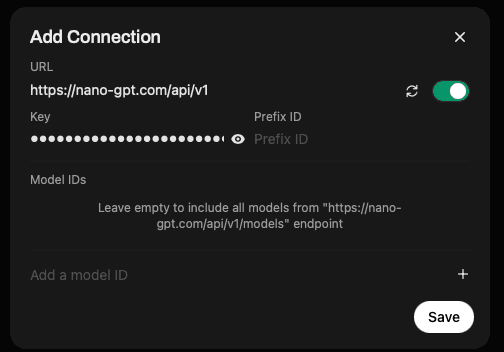
  2. In OpenWebUI, go to Settings and find the "Add Connection" option
  3. Enter the following details:
    • URL: https://nano-gpt.com/api/v1
    • API Key: Your key from step 1
    • Prefix ID: (Optional) Leave empty or add a custom prefix
    • Model IDs: Leave empty to include all available models

That's it! Once you save the connection, you'll have access to all NanoGPT models through OpenWebUI.

Available Models

You can access all our models through this integration, including:

  • ChatGPT
  • Claude 3.7 Sonnet
  • Gemini 2.0 Pro
  • Perplexity
  • And many more!

For a complete list of available models and their pricing, visit our pricing page.

Why Use NanoGPT with OpenWebUI?

  • Full Model Access: Get access to all our models through a single API connection
  • Simple Setup: Just one URL and your API key needed
  • Cost-Effective: Pay only for what you use
  • Reliable Performance: Fast response times and high uptime
  • Flexible Usage: Switch between models easily within the interface

Need Help?

If you run into any issues or have questions about using NanoGPT with OpenWebUI, feel free to:

  • Join our Discord server for community support
  • Contact our support team at support@nano-gpt.com

Milan de Reede

Milan de Reede

CEO & Co-Founder

milan@nano-gpt.com

Related articles

Continue with more NanoGPT guides and research on this topic.

Pay-Per-Use AI: How x402 Enables Instant, Anonymous API Access

Learn how NanoGPT implements the x402 HTTP payment protocol for instant, anonymous AI API access with Nano, USDC, and gasless EIP-3009 signatures.

Dec 1, 2025

How to Build Tool-Using AI Workflows with the Responses API

A practical guide to custom tools, public MCP servers on supported OpenAI models, streaming tool calls, and stored response chains in NanoGPT's Responses API.

Jul 21, 2026

How to Debug Third-Party API Integration Issues

Learn effective strategies to identify and resolve third-party API integration issues, ensuring your application's reliability and performance.

Nov 9, 2025

How to Debug Text Generation API Calls

Learn effective strategies to debug text generation API calls, from understanding error codes to analyzing logs and testing endpoints.

Aug 5, 2025
Back to Blog